
Electronic Signatures: Which StepOver Solution Is Right for You?
Signature pad or tablet? Off-the-shelf software or custom integration? Cloud or on-premises solution? Anyone looking to choose an electronic signature solution is quickly faced with numerous options. The good news: Five questions are all it takes to significantly narrow down the choices.
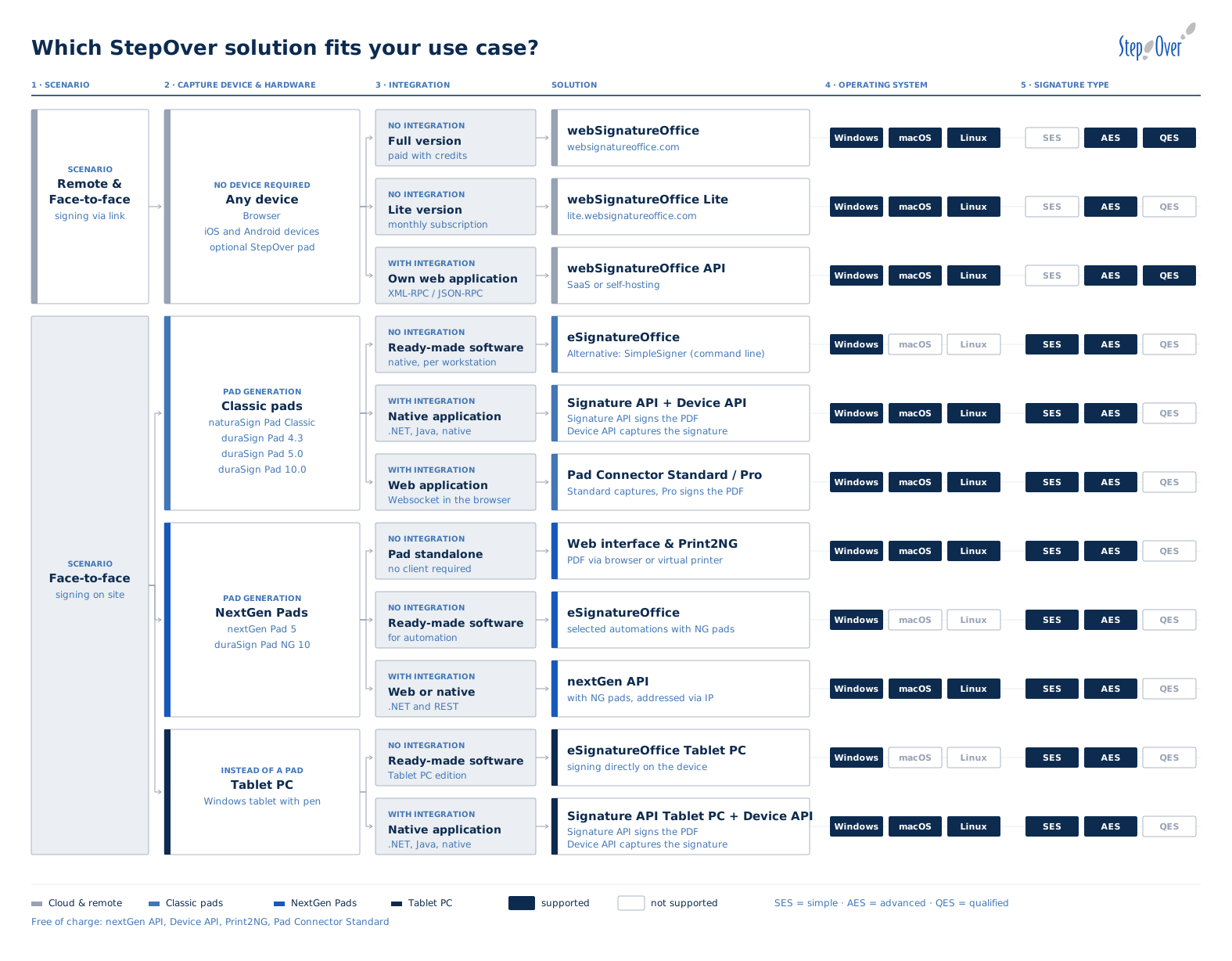
5 Steps to Finding the Right Solution
1
Scenario: Will the document be signed remotely or in person?
2
Input device: signature pad, tablet PC, or no separate device?
3
Integration: Off-the-shelf software or integration into your own application?
4
Operating system: Windows, macOS, or Linux?
5
Signature Type: Simple, Advanced, or Qualified Electronic Signature?
1. Sign remotely or in person?
If people need to sign documents from any location or at a later time, webSignatureOffice provides the ideal cloud-based solution. Signature requests are sent via a link and can be easily processed through a browser or mobile device. Hybrid workflows combining online and in-person signatures can also be implemented.
If signatures are required exclusively in person—such as at a service counter, during a consultation, or at a customer’s location—local StepOver solutions are usually the best fit
2. Which signature collection device is used?
With classic StepOver signature pads, the connection is made via USB. In addition to simply capturing the signature, many models also allow the document to be displayed on the signature pad before signing. Classic signature pads require an additional software solution.
Modern NextGen pads, on the other hand, operate independently and can be accessed via the network in addition to a USB connection. Document display, signature capture, encryption, and PDF generation all take place directly on the pad.
As an alternative tov dedicated signature pads, eSignatureOffice Tablet-PC enables handwritten electronic signatures directly on a Windows tablet using a stylus. With webSignatureOffice, signatures can also be captured on Android and iOS devices.
For those who wish to avoid the need of a device for handwritten signature capture can also sign documents digitally using a certificate. The cloud-based solution webSignatureOffice is available for this purpose.
3. Off-the-shelf software or custom integration?
With no integration effort required, you can get started right away with our signature pads and eSignatureOffice. This ready-to-use software solution enables you to sign PDF documents. SimpleSigner offers a flexible interim solution that requires no programming: It can be launched from existing applications via a command-line call, making it easy to integrate into existing processes.
For integration into native applications, the Signature API and the Device API are available. The Signature API handles the signing of the PDF document, while the Device API is responsible for communicating with the signature pad and capturing the handwriting and biometric data. The Device API is free and is also a prerequisite for using the Signature API.
For integration into web applications using traditional signature pads, the Pad Connector is available. It runs as a WebSocket service on the client and establishes the connection between the web application and the signature pad. The free standard version enables the capture of the handwritten signature. The Pad Connector Pro can additionally insert the captured signature into the PDF document and digitally sign it. For NextGen Pads, this task is handled by the nextGen API. It offers both a .NET and a REST interface and can be used free of charge in conjunction with NextGen Pads.
As a rule of thumb for selection: If you already have traditional signature pads and can install a client component, the Pad Connector Pro is the best choice. For new purchases or if you do not want to install additional software on the clients, the NextGen series is generally the more suitable solution.
4. Which operating system is being used?
eSignatureOffice runs exclusively on Windows. All other solutions such as Signature API, Device API, Pad Connector, nextGen API, and all webSignatureOffice versions work on Windows, macOS, and Linux.
5. What type of electronic signature is required?
Simple Electronic Signature (SES): Only the visual appearance is captured; no signed PDF is generated. The Device API or Pad Connector Standard—both of which are free—are sufficient for this. Typically used for internal communication.
Advanced electronic signature (AES): The PDF is signed and is therefore admissible as evidence: Subsequent changes are detectable, and biometric data is embedded in the document in encrypted form. Available with eSignatureOffice, Signature API, Pad Connector Pro, nextGen API, Print2NG, and webSignatureOffice. This is the level most commonly required in everyday use.
Qualified Electronic Signature (QES): The QES offers the highest level of legal validity. It is available exclusively through webSignatureOffice and requires prior identification of the signer. It is required, for example, for fixed-term employment contracts or consumer loans.
Everything at a Glance